The Invisible Architecture of Network Management
In the modern IT landscape, the Graphical User Interface (GUI) has become the default language of interaction. It is intuitive, visual, and forgiving. However, for network administrators operating within Windows environments, the GUI often acts as a veil, obscuring the underlying mechanics of how data moves and how systems communicate. Beneath the polished icons and dropdown menus lies the Command-Line Interface (CLI), a toolset that offers a direct, unmediated line to the operating system’s core resources. Proficiency in these command-line utilities is not merely an advanced specialization reserved for senior engineers; it is a foundational requirement for anyone tasked with maintaining network integrity. By mastering these specific tools, professionals gain the ability to diagnose connectivity issues, manage configurations, and execute maintenance with a speed and precision that graphical tools often cannot match.
A Tiered Approach to Troubleshooting
Effective network administration does not rely on a random assortment of commands. Instead, it benefits from a structured, hierarchical workflow. This methodology mirrors the natural logic of troubleshooting: first, establish identity; second, verify connectivity; and third, alter configurations. This tiered approach ensures that administrators isolate issues efficiently, preventing unnecessary changes to system settings before the root cause is fully understood. The workflow is divided into three distinct functional groups: identification, diagnostics, and management.
Establishing Identity: The First Tier
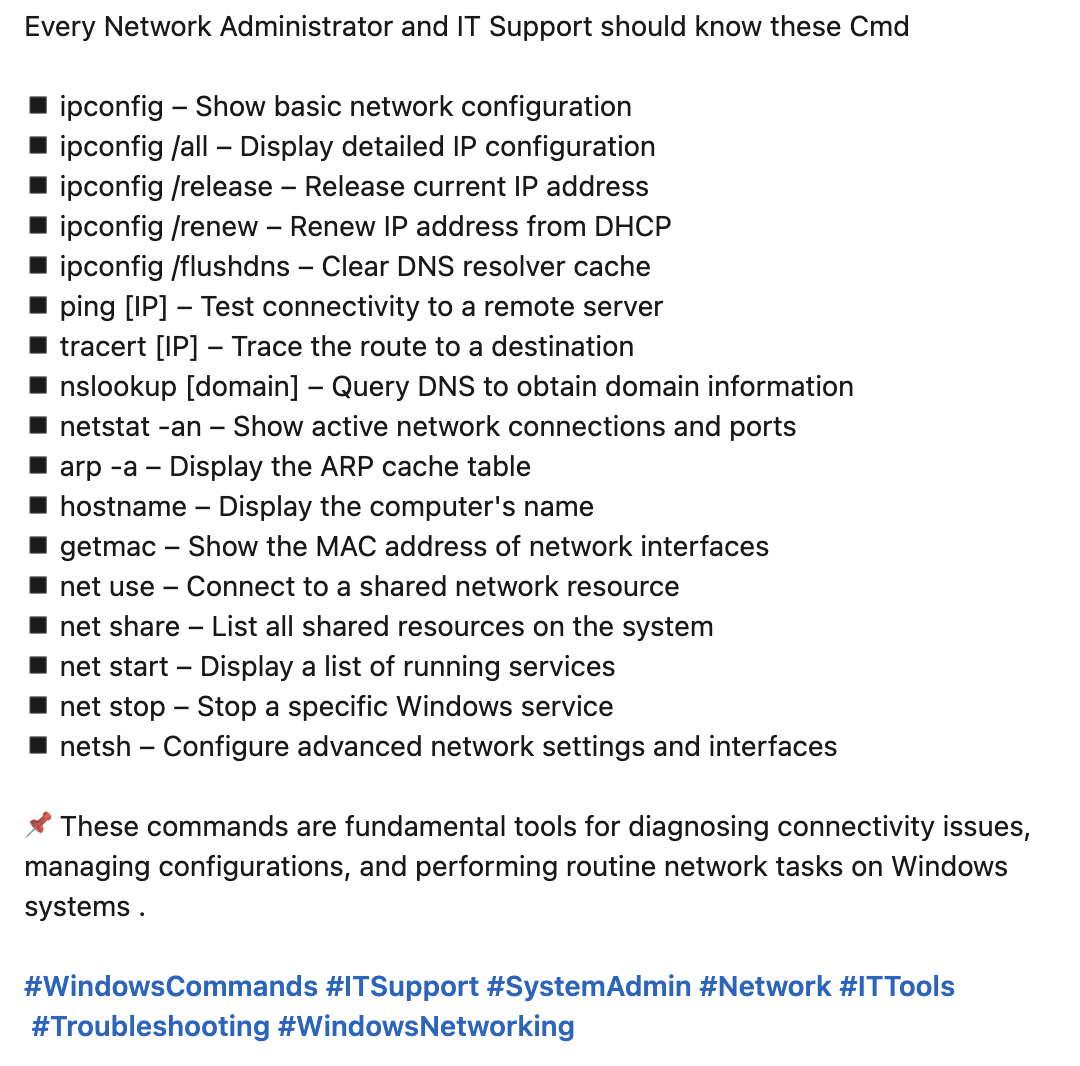
The first step in any troubleshooting scenario is to verify that the local machine has correctly acquired its network parameters. This is where identification commands come into play. The primary utility here is ipconfig. While a basic execution shows the IP address, the /all switch is critical. It reveals comprehensive details, including MAC addresses, DNS servers, and gateway information, providing a complete snapshot of the machine’s network identity. Complementing this is the hostname command, a simple check to ensure the computer name matches expected naming conventions, and getmac, which retrieves the Media Access Control address for hardware-level identification and firewall rule configuration.
Dynamic Host Configuration Protocol (DHCP) issues are common, and the CLI offers a paired mechanism to address them. The commands ipconfig /release and ipconfig /renew allow administrators to manually force the release and re-acquisition of IP assignments. This is a standard fix for IP address conflicts or stale leases, allowing for a quick reset without rebooting the system.
Testing Connectivity: The Diagnostic Tier
Once the local identity is confirmed, the focus shifts to external connectivity and the integrity of the network path. These diagnostic commands help isolate whether issues lie in local configuration, physical connectivity, or name resolution. The most fundamental tool is ping. By executing ping [IP], an administrator verifies basic reachability to a target host. If the target is unreachable, the issue may be local or physical. If it is reachable, the problem likely lies further down the line.
For deeper insight, tracert maps the path packets take to the destination. This is essential for identifying specific hops where packets are dropped, helping to pinpoint whether the failure is local, within the Internet Service Provider, or at the destination. Name resolution issues are addressed by nslookup, which verifies that domain names are correctly translating to IP addresses. This isolates DNS-specific problems from general connectivity failures. Additionally, netstat provides a detailed view of active network connections and listening ports, while arp -a displays the Address Resolution Protocol cache, showing the mapping of IP addresses to MAC addresses on the local segment. This is useful for verifying that the correct hardware is responding to a specific IP.
Active Intervention: The Management Tier
The final tier comprises tools for active configuration changes and service control. These commands move the administrator from passive observation to active intervention. netsh is the utility for advanced settings, offering granular control over network interfaces that basic queries cannot achieve. For server administration, net use and net share are essential for managing file and printer resources, facilitating the creation of shared resources or the mapping of network drives.
Perhaps most valuable in incident response are net start and net stop. These commands allow for the control of specific services. A key insight is their utility in minimizing downtime. Restarting specific network services, such as the DHCP Client or DNS Client, without rebooting the entire system reduces the impact on other users and allows for targeted fixes.
Practical Application and Limitations
Consider a scenario where a user reports no internet access. Using this tiered framework, an administrator would begin with ipconfig to verify the machine has a valid IP address. If the IP is 169.254.x.x (APIPA), the issue is likely a DHCP failure. If the IP is valid, the administrator proceeds to ping the default gateway to test local connectivity. If the gateway is unreachable, the issue is likely physical. If the gateway is reachable, pinging an external IP tests internet connectivity. If external IPs are reachable but websites do not load, nslookup checks DNS resolution. This sequential logic prevents unnecessary changes and ensures the actual point of failure is identified.
However, this framework has limitations. It is strictly limited to Windows operating systems and is not transferable to Linux or macOS environments without significant adaptation. Furthermore, many management commands require Administrator rights, a context often overlooked in basic training. Without this knowledge, users may encounter “Access Denied” errors, leading to confusion. The notes also lack guidance on interpreting complex output, such as the dense data provided by netstat. Finally, there are security implications. Commands like ipconfig /all and netstat can reveal sensitive infrastructure details, such as internal IP ranges and active service ports. In a shared or unsecured environment, executing these commands could potentially expose the system to unauthorized users. Therefore, while the CLI is a powerful tool, it must be used with awareness of its context, permissions, and security risks.